
A corporate traveler joins a video call from the back seat, the presentation is open, and the meeting starts smoothly. Then the vehicle changes roads, the cellular connection hands off between towers, and the call freezes just as the client asks a question. The passenger sees a Wi-Fi symbol, but that symbol alone doesn't guarantee usable internet.
Wi-Fi in a vehicle can support email, messaging, cloud documents, and sometimes video meetings, but performance depends on the cellular backhaul, hardware, route, carrier coverage, and number of connected devices. Fleet operators and corporate travel coordinators should treat it as an engineered service, not a decorative amenity.
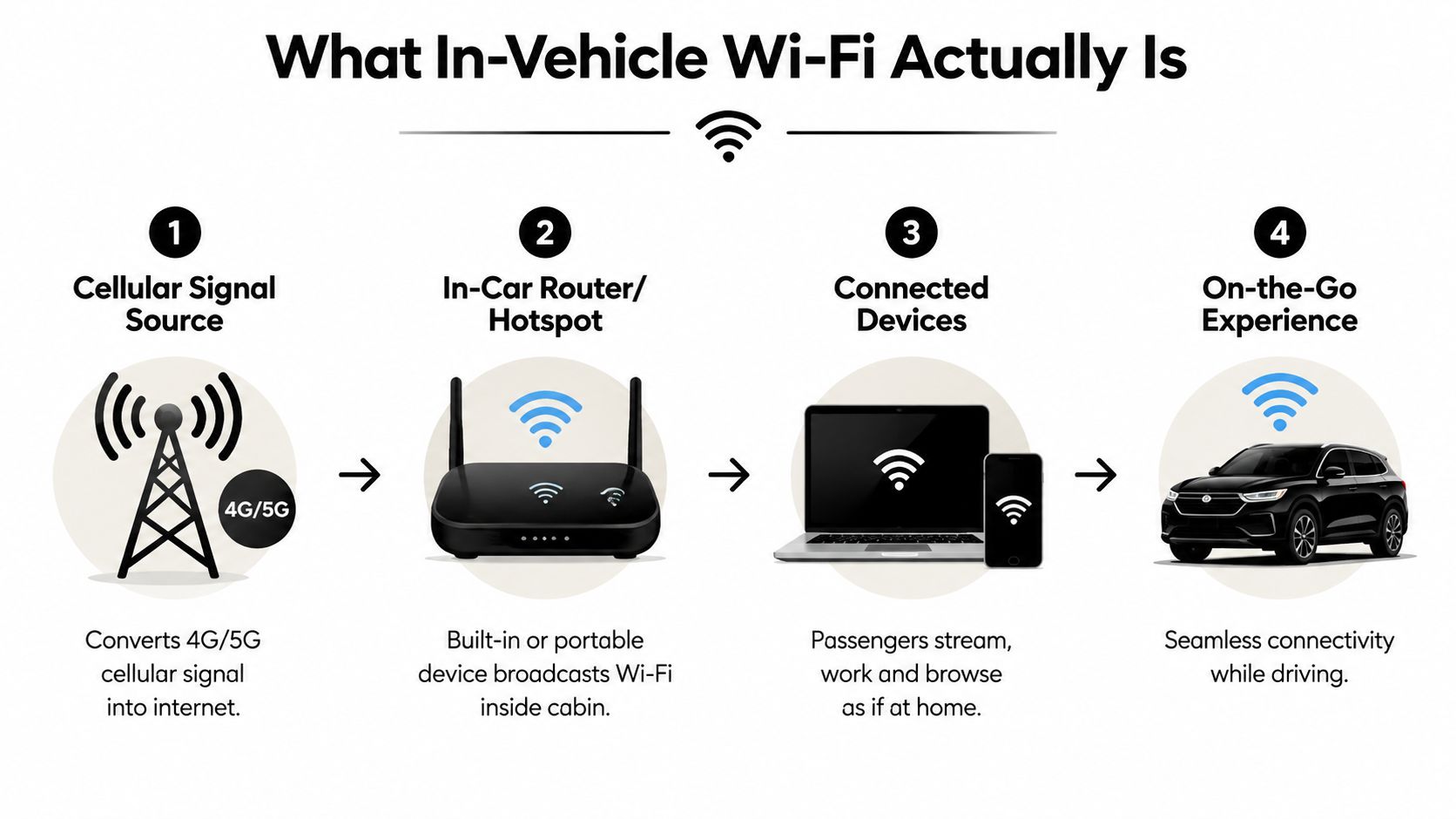
What In-Vehicle Wi-Fi Actually Is
A passenger leaving an airport may need to review a contract before arriving at a client meeting. Instead of consuming a phone's mobile data, the traveler connects a laptop to the vehicle's Wi-Fi network, opens the document, and works through the ride. The experience resembles using Wi-Fi at home or in an office, although the internet source is moving with the vehicle.
The basic arrangement has three parts. A cellular modem receives a 4G or 5G signal, a router or hotspot creates a local wireless network inside the cabin, and passenger devices connect to that network. Some systems can use satellite connectivity instead of cellular service, but the passenger-facing Wi-Fi connection works in much the same way.
A hotspot isn't the same as a fleet network
A personal phone hotspot is the simplest version. It requires no installation, but the phone becomes the modem, battery, antenna, and router at the same time. A single carrier also serves as the only path to the internet, so a weak signal from that carrier can interrupt everyone using the hotspot.
A dedicated vehicle router separates those jobs. Professional hardware can use an external antenna, manage several devices, apply access controls, and remain installed rather than relying on a passenger's phone. Fleet equipment also gives operators a clearer way to manage data plans, firmware, passwords, and troubleshooting.
Built-in automotive systems may combine cellular service with infotainment, remote diagnostics, navigation, and over-the-air vehicle updates. That integration is convenient, but the available passenger service can still depend on a subscription, data policy, and the vehicle manufacturer's network arrangement.
What passengers actually notice
Passengers don't experience cellular bands or antenna gain. They notice whether a webpage loads, whether a video call remains intelligible, and whether several people can connect without one device consuming all available capacity.
For travelers comparing options, a phone hotspot may be enough for occasional email. A corporate shuttle, executive vehicle, or coach carrying several passengers needs a managed router and a service plan designed for shared use. Travelers who need connectivity before or after the ride can also browse tourist eSIM plans for a separate mobile backup, rather than assuming the vehicle network will cover every part of the journey.
Comparing the Four Technical Approaches
There isn't one universally reliable way to provide Wi-Fi in a moving vehicle. The right choice depends on route coverage, passenger load, security requirements, installation constraints, and how costly an interruption would be.
| Approach | Typical Speed | Reliability | Best For |
|---|---|---|---|
| Mobile hotspot | Varies with the phone and carrier | Suitable where the phone has a strong signal, vulnerable to one-carrier outages and battery limits | Individual travelers and occasional use |
| Built-in OEM router | Varies by vehicle, subscription, and cellular coverage | Convenient, but service may be limited by plan rules or vehicle hardware | Private vehicles and standard passenger amenities |
| Bonded cellular system | Varies with combined carrier coverage and equipment | Stronger resilience because multiple cellular paths can be managed together | Executive fleets, shuttles, and business-critical travel |
| Satellite connectivity | Varies with satellite service, sky visibility, and equipment | Useful beyond reliable tower coverage, but can face obstruction and higher latency | Remote routes and specialized operations |
Mobile hotspots
A phone hotspot wins on accessibility. The passenger already owns the device, can activate it quickly, and avoids vehicle installation. It works well for short email sessions or messaging when the phone has a strong connection.
It fails as a fleet strategy because the phone may leave with the passenger, overheat, run out of battery, or apply data-management rules that the operator can't control. A driver's phone also shouldn't become the shared infrastructure for a vehicle full of clients.
Built-in OEM routers
An OEM system offers a clean passenger experience. The vehicle may display the network name, support integrated controls, and keep the hardware out of sight. For private owners, that convenience can outweigh limitations.
Fleet managers should read the service terms carefully. A built-in system may have restrictions on data use, device count, subscription renewal, or service availability. It can also be difficult to replace or reconfigure when a vehicle changes assignment.
Bonded cellular systems
Bonded cellular equipment combines more than one cellular connection and manages traffic across available paths. The system can favor the stronger connection, distribute traffic, or maintain service when one carrier performs poorly. That doesn't eliminate dead zones, but it reduces dependence on a single network.
This approach costs more and requires proper installation, SIM management, monitoring, and maintenance. For executive travel where passengers need to work during transit, the added resilience can justify the operational complexity.
Satellite connectivity
Satellite service becomes relevant when ground-based coverage is inconsistent or absent. It can extend service to remote roads, but the installation needs a suitable view of the sky, and the system may introduce more delay than a nearby cellular connection.
Satellite is rarely the first choice for an urban airport transfer. It makes more sense for remote tourism, specialized logistics, and routes where cellular gaps are predictable and operationally important.
Why Vehicle Connectivity Matters Now
Vehicle connectivity has moved beyond a luxury feature because travelers increasingly treat transit time as working time. A corporate group may need to review an agenda between an airport and a meeting venue, while an event organizer may want guests to share updates throughout a long transfer. In both cases, a connection can improve the journey, but only if it performs consistently enough for the intended task.
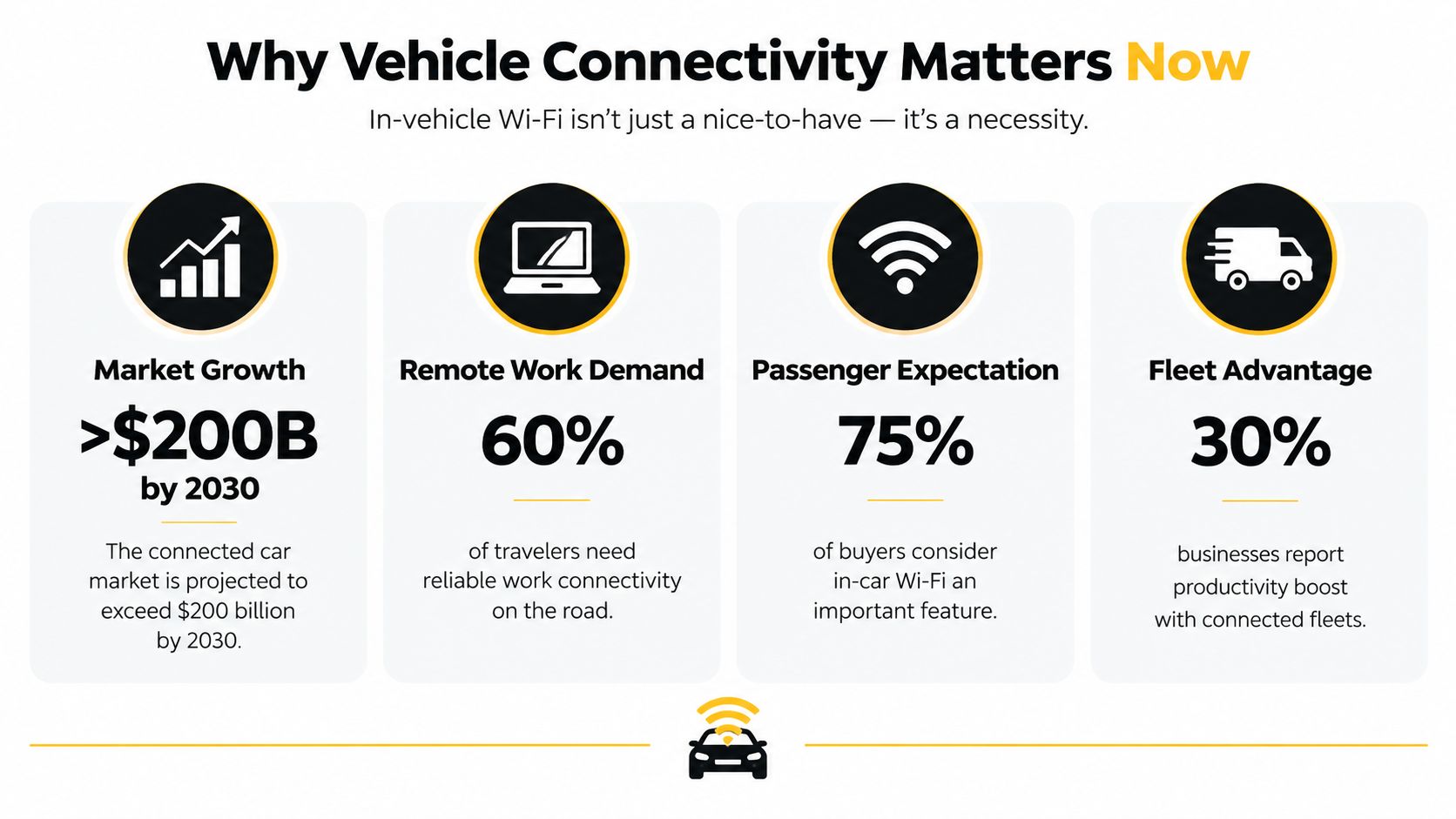
The market signals a broad shift. One 2026 industry estimate valued the global in-car Wi-Fi market at USD 19.7 billion in 2025 and projected it to reach USD 47.7 billion by 2035, with a 9.6% CAGR over that period, according to the in-car Wi-Fi market forecast. The estimate reflects Wi-Fi being bundled with embedded cellular services, infotainment, and connected-car functions rather than treated as an isolated accessory.
The adoption gap creates a service opportunity
Counterpoint Research data summarized in industry coverage reported that 75% of passenger cars sold globally in 2024 had embedded cellular connectivity, an increase of 8 percentage points year over year. Embedded cellular provides the foundation for hotspot services, app features, over-the-air updates, and passenger internet access.
The same source describes a different picture for ownership. 9% of surveyed car owners said their vehicle had in-car Wi-Fi, while 48% of prospective buyers said their next vehicle purchase was at least somewhat likely to include it. The difference matters to transportation providers because a feature that remains uncommon in private ownership can distinguish a professionally managed ride.
The business case depends on the use case
A Wi-Fi network can support pre-meeting preparation, passenger communications, entertainment, and operational applications. It can also create disappointment when an operator advertises “high-speed internet” without explaining route limitations, data policies, or device capacity.
The strongest business case comes from matching the service to a defined passenger need. A premium airport transfer may need stable email and messaging. A corporate shuttle may require managed access for several professionals. A remote coach may need a different backhaul entirely. Market growth is meaningful, but service quality determines whether the investment feels useful.
Security and Privacy Best Practices
A vehicle network can carry guest browsing, driver communications, corporate documents, payment activity, and operational data in the same physical space. Those uses shouldn't share unrestricted access. A guest's laptop must not be able to reach vehicle systems because both devices connect through the same router.
IEEE automotive work highlights the difficulty of using external access points in high-mobility environments, while industry coverage points to the growing importance of Wi-Fi 6 and newer standards in automotive connectivity. The practical implication is straightforward: better radio performance doesn't replace network separation.
Separate passengers from operations
Fleet managers should configure a guest network that is isolated from driver devices, payment terminals, cameras, telemetry, and other operational systems. VLANs, firewall rules, and zero-trust access policies can limit which devices communicate with each other.
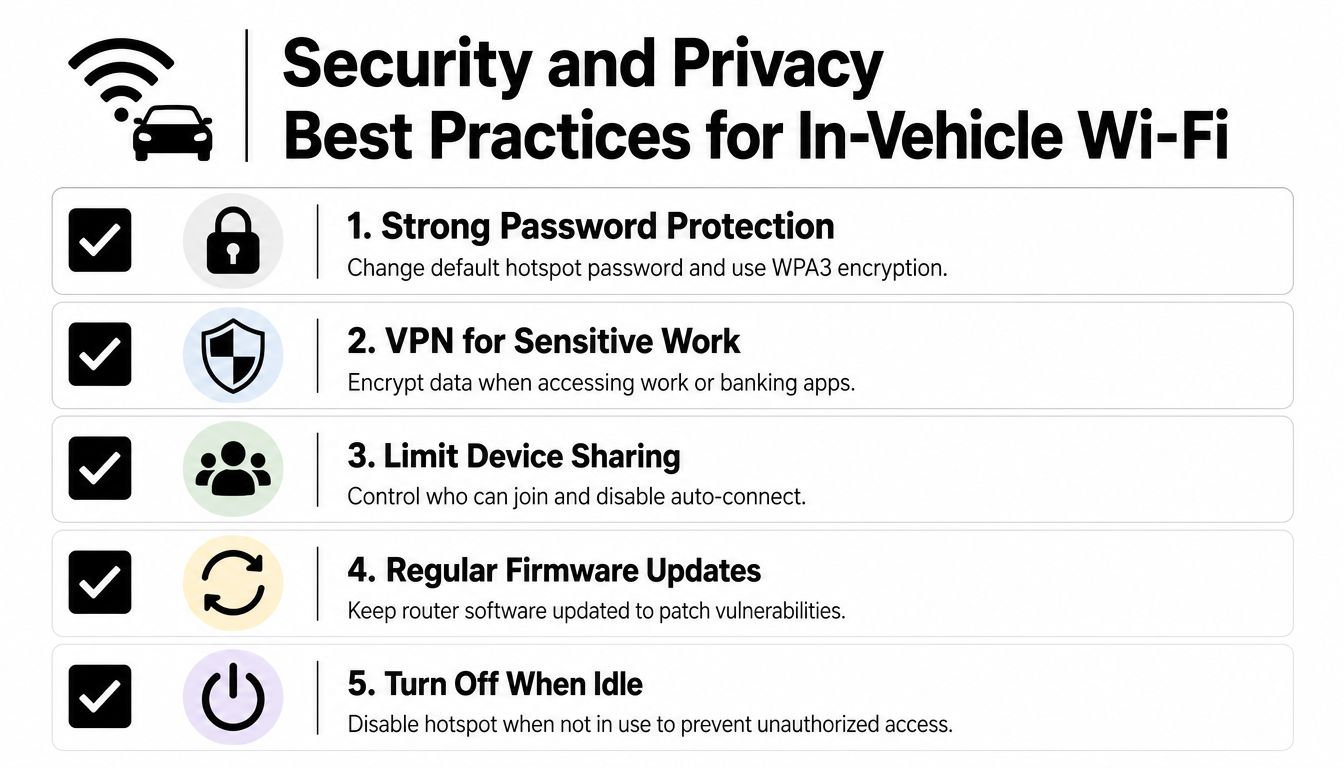
A captive portal can provide guest terms, access controls, and a clear point for authentication. It shouldn't be used as a substitute for encryption. The network should use current wireless security, including WPA3 where supported, and administrators should change default credentials before placing equipment into service.
Practical rule: Passenger convenience should never determine access to vehicle-control or business-critical systems.
Give passengers a safe operating routine
Corporate travelers should treat vehicle Wi-Fi as a shared network, even when the service is professionally installed. Use a company VPN for sensitive work when policy requires it, avoid accepting unexpected certificate warnings, and disable automatic connection to unfamiliar networks.
A few controls prevent common mistakes:
- Use strong credentials: Change the default hotspot password and avoid sharing administrative credentials with passengers.
- Control device access: Disable auto-connect where practical and remove devices that no longer need access.
- Update the router: Apply firmware updates through the operator's maintenance process so known vulnerabilities don't remain open.
- Limit exposure when idle: Turn off a portable hotspot when nobody needs it, particularly if the device isn't under fleet management.
- Protect the endpoint: Keep the laptop and phone updated, use screen locking, and avoid leaving corporate files downloaded on a shared device.
Corporate coordinators should ask providers whether passenger traffic is segmented, how access credentials are handled, and who receives router alerts. These questions reveal more than a generic claim that Wi-Fi is available.
Realistic Performance Expectations on the Road
The Wi-Fi icon measures the connection between a passenger's device and the vehicle router. It doesn't measure the quality of the router's cellular backhaul. A laptop can show full local signal strength while the vehicle itself has weak tower coverage, congestion, or a connection in the middle of a network handoff.
Terrain and route design matter. Urban corridors may offer dense coverage but can still experience congestion. Suburban and rural roads can include longer gaps, hills, tunnels, and changing tower footprints. Vehicle speed can add more frequent handoffs, especially when the route crosses coverage boundaries.

Match the task to the connection
Email, messaging, calendar work, and text-based documents usually tolerate brief slowdowns. Live video meetings are less forgiving because they depend on sustained throughput, stable latency, and low packet loss. Streaming can work well under favorable conditions, but several passengers streaming at once can consume capacity quickly.
Large file transfers are the least suitable task to schedule without a fallback. A download may begin normally and then stall when the vehicle moves into weaker coverage. A traveler should download essential documents before departure and keep critical meeting materials available offline.
Plan around predictable failure points
Operators can test routes at different times, record dead zones, and identify sections where video meetings regularly become unstable. Travel coordinators can then advise passengers to schedule high-stakes calls during stronger coverage areas, or arrange a stop when uninterrupted participation matters.
Industry analysis of the in-car Wi-Fi market identifies a practical gap in current coverage of the topic. Market forecasts discuss a global market valued at USD 20.9 billion in 2026 and projected to reach USD 47.7 billion by 2035, but those figures don't tell a traveler whether a video call will survive a particular route. Operators need service tests, route knowledge, and honest communication rather than a speed promise detached from conditions.
A reliable vehicle Wi-Fi policy says what the service supports, where it may fail, and what passengers should do when it does.
How Max's Luxury Rides Delivers Fleet-Wide Connectivity
A transportation provider managing executive sedans, luxury SUVs, Mercedes vans, Sprinter limousines, shuttles, minibuses, and coach buses can't evaluate Wi-Fi as if every vehicle were the same. Cabin size affects access-point placement, passenger count affects capacity, and a vehicle assigned to airport transfers may follow a very different route from one used for long-distance service.
A practical fleet program starts with hardware matched to the vehicle. Smaller vehicles may use a dedicated cellular router with an appropriately positioned antenna. Larger coaches may need broader cabin coverage and more careful equipment placement. The operator also needs carrier plans that reflect actual passenger use, not merely a low advertised monthly cost.
Maintenance belongs on the readiness checklist
Router power, antenna connections, SIM status, firmware, and network credentials should be checked alongside vehicle cleanliness, fuel or charge level, climate control, and mechanical readiness. A device that worked last month may fail after a battery issue, software update, physical disturbance, or plan change.
Operations staff should record recurring trouble spots by route and vehicle. A fleet analysis platform such as the Fleetalyse fleet analysis tool can help organize vehicle information and operational review, while connectivity-specific checks still need to be defined by the transportation provider.
What corporate clients should ask
Max's Luxury Rides Inc. states that Wi-Fi is included among vehicle amenities for relevant Chicago and long-distance chauffeur services. For a corporate booking, the useful questions are operational: which vehicle class is assigned, whether Wi-Fi is available on that specific trip, how many devices the system is intended to support, and what happens if cellular coverage drops.
The company operates around airport transfers, corporate travel, special occasions, and event transportation, with professional chauffeurs and 24/7 operations described in its service information. Those details matter because connectivity is only one part of a dependable ride. A clean vehicle, punctual dispatch, responsive communication, and a clear escalation process determine whether passengers can use travel time productively.
Practical Tips for Passengers and Travel Planners
Passengers can improve the experience before the vehicle moves. Ask for the exact network name and password, connect only after confirming both with the chauffeur or coordinator, and turn off automatic updates, cloud backups, and high-bandwidth streaming when the connection is shared.
If a page won't load, disconnect and reconnect once, move the device closer to the cabin access point, and check whether other passengers are experiencing the same problem. If everyone is offline, the issue is probably the vehicle's backhaul rather than your laptop. Keep a phone hotspot available for urgent messages, but don't assume it will use a different carrier or solve a coverage gap.
Travel planners should put the following questions into the booking process:
- Coverage: Is Wi-Fi available on the assigned vehicle and route?
- Capacity: How many passenger devices can connect before service quality declines?
- Data policy: Are there usage limits, throttling rules, or restricted activities?
- Security: Is guest traffic separated from driver and operational systems?
- Fallbacks: Can the provider offer a different vehicle, carrier path, or planned stop for a critical call?
- Readiness: Does staff check the router and connection before dispatch?
For important work, download documents in advance, save meeting notes offline, and schedule calls around known coverage rather than treating the ride as a guaranteed office. Newer cellular and Wi-Fi standards may improve capacity and handoffs, but they won't remove terrain, congestion, or carrier limitations.
Max's Luxury Rides Inc. provides airport transfers, corporate transportation, event packages, and group travel in vehicles that include onboard Wi-Fi among applicable amenities. Visit Max's Luxury Rides Inc. to discuss a vehicle and service plan that fits your passenger count, route, and connectivity needs.